WebCivil Supreme is the official online case search system for New York Supreme Court civil matters. It allows the public to search civil court cases, review case status, check scheduled court appearances, and view publicly available filing information from participating Supreme Courts across New York. Attorneys, litigants, businesses, journalists, and researchers use this service to follow civil litigation without visiting the courthouse. The system supports multiple search methods, making it easier to locate records by case number, party name, attorney name, or other available details. It serves as a reliable source for current court information published by the New York State Unified Court System.
WebCivil Supreme provides a simple way to monitor the progress of civil lawsuits from the initial filing through later court proceedings. Search results may include the assigned judge, court location, party information, attorney details, motion history, hearing dates, and case status, depending on public record availability. This service covers many types of Supreme Court civil cases, including contract disputes, commercial litigation, property disputes, personal injury claims, and other civil actions. By offering online court record searches, WebCivil Supreme helps users find public case information quickly while supporting transparency within New York’s civil court system.
Search Cases in WebCivil Supreme
WebCivil Supreme provides several search options to help users find New York Supreme Court civil case records. By entering the correct case information, users can review public case details, court schedules, filing history, and the latest case status, while WebCrims NY Records may provide additional information for users researching related court records from the official court database.
Official WebCivil Supreme Search Page: https://iapps.courts.state.ny.us/webcivil/FCASSearch?param=I
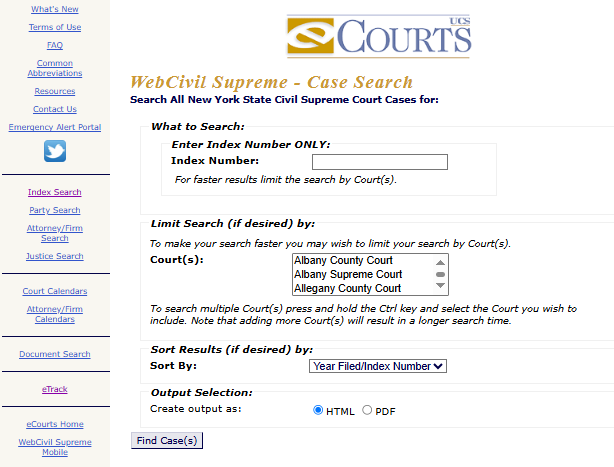
Search by Index Number
The Index Number search is the most accurate method for locating a civil case. Each Supreme Court civil case receives a unique index number, making it easier to find the correct record.
Steps
- Visit the official WebCivil Supreme search page.
- Select Index Number Search.
- Enter the complete Index Number.
- Select the county where the case was filed.
- Click Search.
The results page may display the case title, current status, assigned Justice, party names, attorney information, filing history, court appearances, and other public case details.
Search by Party Name
If the index number is unavailable, users can search by the name of the plaintiff or defendant. This option is helpful when only a person’s or business’s name is known.
Steps
- Open the WebCivil Supreme search page.
- Select Party Name Search.
- Enter the party’s last name and first name if available.
- Choose the appropriate county.
- Select Search.
Matching records may include case numbers, court location, assigned Justice, case status, scheduled appearances, and attorney information.
Search by Attorney Name
The Attorney Name search helps locate civil cases handled by a particular lawyer. This option is commonly used by attorneys, legal assistants, and clients tracking active litigation.
Steps
- Open the official search page.
- Choose Attorney Name Search.
- Enter the attorney’s name.
- Select the county if requested.
- Click Search.
Search results usually list civil cases associated with that attorney, along with case status, assigned Justice, hearing dates, and court information.
Search by Justice Name
Users can search cases assigned to a specific Supreme Court Justice. This option is useful for checking a Justice’s current civil calendar and scheduled matters.
Steps
- Visit the WebCivil Supreme search page.
- Select Justice Name Search.
- Enter or select the Justice’s name.
- Choose the county when required.
- Click Search.
The search results may show active cases, conference dates, motion schedules, court appearances, and the current status of each listed case.
Accurate Search Results
Accurate information helps users find the correct case more quickly. A few simple checks can improve search results and reduce incorrect matches.
- Use the Index Number whenever it is available.
- Check the spelling of party and attorney names before searching.
- Select the correct New York county.
- Enter complete names instead of initials whenever possible.
- Try another search method if no results appear.
- Recently filed cases may take time to appear in the online system.
- Confirm that the case belongs to the New York Supreme Court before searching.
WebCivil Supreme Services
WebCivil Supreme offers several online services that help users follow New York Supreme Court civil cases from one place. The portal makes it easier to review public case information, check court schedules, and monitor case activity without visiting the courthouse.
Civil Cases Available Through WebCivil Supreme
The portal covers many types of civil matters filed in the New York Supreme Court. Whether the case involves a business dispute or a personal lawsuit, users can search available public records using the online system.
Some of the most common case types include:
| Civil Case Type | Description |
|---|---|
| Contract Disputes | Cases involving agreements between two or more parties. |
| Personal Injury | Lawsuits seeking compensation after an injury. |
| Commercial Litigation | Business-related legal disputes. |
| Property Disputes | Cases involving land, ownership, or property rights. |
| Medical Malpractice | Claims involving healthcare providers. |
| Insurance Cases | Disputes over insurance coverage or claims. |
Case Information You Can Access
Once a case is located, the portal provides a summary of its public record. The available information depends on the court file and the current stage of the case. Users can review details such as the case title, index number, assigned Justice, parties involved, attorney names, filing history, motion activity, scheduled appearances, and the latest case status. This information helps users follow court proceedings and confirm important updates before attending court.
Court Calendar Availability
WebCivil Supreme includes calendar information for many active civil cases. This feature allows users to check whether a hearing, conference, or motion has been scheduled.
Before visiting the courthouse, users can review:
- Upcoming hearing dates
- Conference schedules
- Motion return dates
- Court part assignments
- Assigned Justice
- Future court appearances
Court calendars are updated as new information becomes available through the New York State Unified Court System, so checking the schedule before a court visit is always a good practice.
Portal Access for Attorneys and the Public
WebCivil Supreme is available to both legal professionals and members of the public. Standard case searches do not require a user account, making public court information easy to find.
Attorneys often use the portal to monitor active litigation and prepare for upcoming court dates. Plaintiffs and defendants can follow the progress of their own cases, while businesses, journalists, and researchers use the system to review public civil court records. Although many case details are available online, sealed records and confidential documents remain unavailable through public searches under New York court rules.
Court Records and Case Activity
WebCivil Supreme provides public information about the progress of civil cases filed in the New York Supreme Court. After locating a case, users can review court activity, scheduled events, and important updates that help track the case from filing through later proceedings.
Filing Information
Every civil case begins with documents submitted to the court. WebCivil Supreme records many of these filing events, allowing users to follow the timeline of a case. A typical case record may include the filing date, index number, case title, document activity, motion filings, and other publicly available court entries. Reviewing this information helps users see how a case has progressed over time.
Assigned Judges and Attorneys
Each civil case is assigned to a Supreme Court Justice, and the case record usually lists the attorneys representing the parties. Users can review the assigned Justice, attorney names, and the parties involved in the lawsuit. If legal representation changes during the case, the public record is updated when new information is entered into the court system.
Hearing Dates and Court Appearances
Court schedules are an important part of every civil case. WebCivil Supreme allows users to check upcoming appearances before visiting the courthouse.
Information may include hearing dates, conference schedules, motion return dates, trial appearances, court part assignments, and the location where the matter will be heard. Checking the calendar before the scheduled date helps users confirm the latest court schedule.
Case Status Updates
The case status section shows the current stage of a civil lawsuit. Users can quickly determine whether a case is active, pending, scheduled for a future court appearance, or has reached a final disposition. As new court activity is entered, the status is updated to reflect recent filings, hearings, motions, or court decisions. Reviewing the latest status helps attorneys, litigants, and members of the public stay informed about the progress of a case.
Court Calendars and Case Documents
Keeping track of court dates is an important part of any civil case. WebCivil Supreme brings together calendar information and public case activity so users can check scheduled proceedings and review available court records from a single portal. The calendar section helps users prepare for upcoming hearings by showing the latest scheduling information entered by the court. At the same time, the case record section provides a timeline of public case activity, making it easier to follow the progress of a lawsuit and verify important court events before visiting the courthouse.
Civil Court Calendars
The civil court calendar helps users confirm whether a case has an upcoming court event. It is frequently checked before attending court to verify the latest schedule.
Calendar information may include:
| Calendar Detail | Purpose |
|---|---|
| Hearing Date | Shows when the case is scheduled to be heard. |
| Conference Date | Lists scheduled conferences between the parties and the court. |
| Motion Calendar | Displays dates for motion hearings. |
| Trial Date | Shows scheduled trial appearances when available. |
| Court Part | Identifies the courtroom or court part assigned to the case. |
| Assigned Justice | Shows the Justice responsible for the proceeding. |
Attorney Calendar Search
For attorneys handling several cases, searching one case at a time can take extra effort. The Attorney Calendar Search groups scheduled court appearances connected with a particular attorney.
This feature is commonly used to:
- Review upcoming hearings.
- Check conference schedules.
- Confirm motion appearance dates.
- View assigned court parts.
- Track multiple active civil cases.
Available Court Documents
WebCivil Supreme focuses on public case information rather than serving as a document download system. Users can review many case updates online, but the availability of documents depends on New York court rules. A typical case record may provide filing history, motion entries, party names, attorney information, case status, and court appearance details. If a document has been sealed or is restricted from public inspection, it will not be available through the portal. In those situations, the appropriate court clerk’s office is the proper source for record requests.
Civil Case Status
WebCivil Supreme displays the current status of a civil case, helping users follow its progress through the New York Supreme Court. Each status reflects a different stage in the court process and provides a quick snapshot of where the case stands. Checking the case status before a scheduled court appearance or filing can help users stay informed about recent court activity. As new information is entered into the court system, the status is updated to reflect the latest developments.
Pending Cases
A Pending status means the civil case is still active and has not reached a final decision. The court may continue to schedule hearings, conferences, or motion dates while the matter remains open. Users may notice new filings, additional court appearances, or changes to the case calendar until the court issues a final order or judgment.
Disposed Cases
A Disposed status shows that the court has completed the case. This usually means the matter has reached a final resolution through a judgment, settlement, court order, or another legal outcome. Although the case is closed, users can still review public information such as the filing history, previous court appearances, assigned Justice, and other available case details.
Dismissed Cases
A Dismissed status indicates that the court has ended the case without moving forward to a final trial or judgment on the original claims. A case may be dismissed for several legal or procedural reasons. The case record usually continues to display public information, including earlier filings, court dates, attorney details, and the dismissal entered by the court.
Adjourned Cases
An Adjourned status means a scheduled hearing or court appearance has been postponed to another date. An adjournment does not close the case, and the lawsuit remains active until further court action. Users should check the updated court calendar after an adjournment, as the portal may display a new hearing date, conference schedule, or other future court event once it has been entered into the system.
WebCivil Supreme and NY eCourts
WebCivil Supreme and NY eCourts are both part of the New York State Unified Court System, but they serve different purposes. Knowing the difference between these services helps users choose the right portal for searching civil case records, checking court activity, or finding information from other New York courts. Although the two systems are connected, each one offers different search options and court coverage. Selecting the appropriate service can save time and produce more accurate search results.
Features Available in WebCivil Supreme
WebCivil Supreme focuses on New York Supreme Court civil cases. It is intended for users who need detailed information about civil lawsuits filed in participating Supreme Courts.
Some of the main features include:
| Feature | Purpose |
|---|---|
| Civil Case Search | Locate Supreme Court civil cases. |
| Index Number Search | Find a case using its unique index number. |
| Party & Attorney Search | Search using party or attorney names. |
| Justice Search | View cases assigned to a specific Justice. |
| Case Status | Check the current stage of a civil case. |
| Court Calendar | Review upcoming hearings and conferences. |
Features Available in NY eCourts
NY eCourts provides a broader collection of online court services across the New York State court system. It acts as a central starting point for several case search applications, including WebCivil Supreme.
Through NY eCourts, users can:
- Open different court search services.
- Search case information for participating courts.
- Review court calendars.
- Find court locations.
- Check public court records available through supported applications.
Choosing the Right Court Service
The best service depends on the type of case being searched. Users looking for Supreme Court civil cases should use WebCivil Supreme, while those searching for information from other participating New York courts or different court applications can begin with NY eCourts. Before starting a search, it is helpful to confirm the court handling the case and gather details such as the index number, party name, or attorney name. Using the correct portal from the beginning makes the search process faster and reduces the chance of searching in the wrong court system.
Benefits and Search Limitations
WebCivil Supreme makes it easier to review public information for New York Supreme Court civil cases without visiting the courthouse. Like any online court system, it offers many useful features, but users should know that some records and search results are limited by court policies and public record rules. Before searching, it helps to know what information the system can provide and why certain cases or records may not appear. This can save time and reduce confusion during the search process.
Benefits of WebCivil Supreme
WebCivil Supreme is widely used by attorneys, litigants, businesses, and members of the public who need quick access to civil court information. The portal provides current case details in a simple and organized format.
Some of the key benefits include:
- Search public Supreme Court civil cases online.
- Check case status without contacting the courthouse.
- Review hearing and conference schedules.
- Find cases by Index Number, party, attorney, or Justice.
- View filing history and case activity.
- Monitor ongoing civil litigation from any location with internet access.
Cases That May Not Appear
Although WebCivil Supreme contains many public civil case records, it does not include every case filed in New York. Certain records are restricted or unavailable through public searches.
A case may not appear if:
| Possible Reason | Explanation |
|---|---|
| Sealed Case | Public access has been restricted by court order. |
| Confidential Record | The information is protected under New York law. |
| Recently Filed Case | The record has not yet been added to the online system. |
| Incorrect Search Details | An error in the search information prevents a match. |
| Unsupported Court | The case belongs to a court or system outside WebCivil Supreme. |
Search Issues
Most search problems are caused by incomplete or incorrect information rather than a system error. A few simple checks can often resolve the issue.
Users should:
- Verify the Index Number before searching.
- Check the spelling of party and attorney names.
- Select the correct New York county.
- Try another search option if the first attempt is unsuccessful.
- Allow time for newly filed cases to appear in the database.
- Confirm that the case is a New York Supreme Court civil case.
Frequently Asked Questions
WebCivil Supreme gives users an easy way to search public New York Supreme Court civil case records. The questions below answer common concerns about searching cases, viewing court calendars, and finding public court information through the official portal.
Is WebCivil Supreme free to use?
Yes. WebCivil Supreme is a free online service provided by the New York State Unified Court System for public civil case searches. Users can search case records, review case status, and check court calendars without paying any fee. The portal is available to attorneys, litigants, businesses, and the general public. Fees may apply only when requesting certified copies or other official records from the appropriate court clerk’s office.
Can I search without an index number?
Yes. Although an Index Number provides the quickest and most accurate search, it is not required for every search. Users can locate many civil cases by entering a Party Name, Attorney Name, or Justice Name. Using the correct county and accurate spelling improves the chances of finding the correct record. If the first search does not return results, another search method can be used.
Why can’t I find my civil case?
Several factors can prevent a case from appearing in search results. The case may have been filed recently and may not yet be available in the online system, or the search details may contain spelling errors or the wrong county selection. Sealed or confidential cases are not displayed through public searches. Confirming the search information before trying again often resolves the issue.
Does WebCivil Supreme include every New York court?
No. WebCivil Supreme is intended for New York Supreme Court civil cases and does not include every court across the state. Cases handled by Criminal Court, Family Court, Housing Court, or other courts may appear in different New York court applications. Users should confirm which court is handling the case before starting a search. This helps avoid searching in the wrong court database.
Can I view court calendars online?
Yes. WebCivil Supreme provides online court calendar information for many active civil cases. Users can review hearing dates, conference schedules, motion appearances, assigned court parts, and the Justice handling the matter when that information is publicly available. Since court schedules can change, checking the calendar before attending court is a good practice. This helps users stay informed about the latest scheduling updates.