WebCrims NY is an online criminal court case search system that helps users find public information about criminal cases handled in many New York courts. It allows searches by defendant name, case number, or court calendar, making it easier to check court dates, case status, charges, and hearing details from one place. The system supports people who need quick court information without visiting a courthouse. It serves defendants, attorneys, family members, journalists, and members of the public looking for available criminal court records. Since court records are updated regularly, users should review the latest information before relying on any search result.

WebCrims NY provides a simple way to search criminal court records and follow case activity across participating New York courts. The portal displays publicly available case details, helping users verify scheduled appearances, monitor case progress, and identify the court handling a criminal matter. Search results may vary depending on the court, case type, and record availability. Some sealed, confidential, or restricted cases are not displayed through the public search system. Using accurate search details, such as the correct defendant name or case number, helps produce more accurate results and saves time during the search process.

How to Search for Records on WebCrims NY
WebCrims NY offers several search methods, allowing users to locate criminal court records based on the information they have available. Users can search with a Case Identifier (Case or Summons Number), Defendant Name, or Court Calendar, then narrow the results by county or date range when those filters are available. Choosing the right search option helps return more accurate results and reduces the time spent reviewing unrelated records.
Official WebCrims NY Search Portal: https://iapps.courts.state.ny.us/webcrim_attorney/DefendantSearch
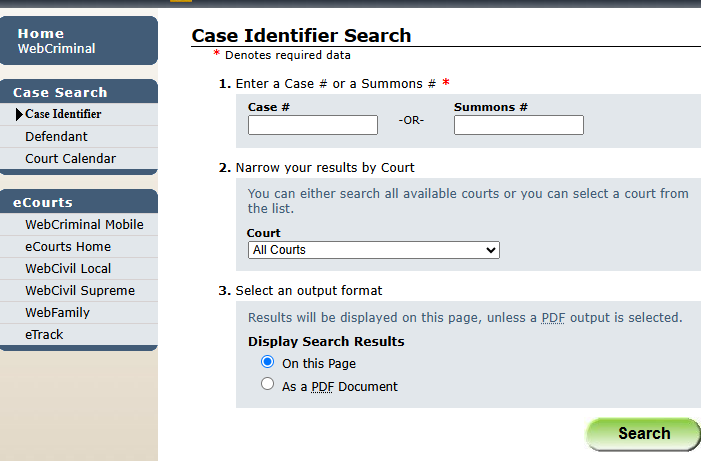
Search by Case Identifier
A Case Identifier Search is the most accurate option for finding a specific criminal court case. This method works best for users who already have a case number or summons number from a court document.
Steps to search by Case Identifier:
- Open the official WebCrims NY search portal.
- Select Case Identifier Search.
- Enter the complete Case Number or Summons Number in the search field.
- Verify that every letter, number, and symbol matches the court document.
- Click Search to view the matching case.
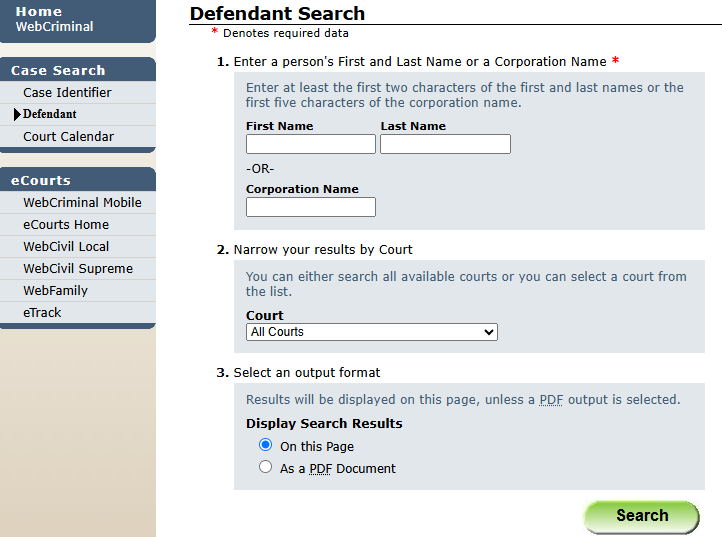
Search by Defendant Name
A Defendant Name Search helps locate criminal court records when the case number is unavailable. Using the person’s legal name improves the chances of finding the correct record.
Steps
- Open the official WebCrims NY search page.
- Select Defendant Name Search.
- Enter the defendant’s Last Name.
- Enter the First Name if known.
- Choose a county if the option is available.
- Click Search.
- Review the list of matching cases.
- Select the correct record to open the case details.
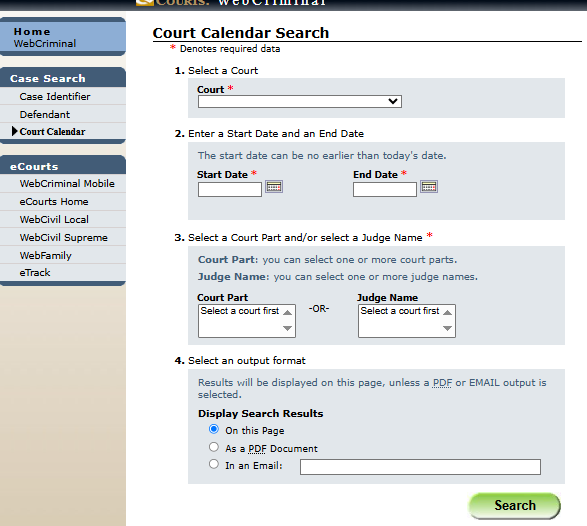
Search by Court Calendar
The Court Calendar Search is useful for checking scheduled criminal court appearances on a specific date. This option helps users view upcoming hearings listed by the selected court.
Steps to search the Court Calendar:
- Open the WebCrims NY search portal.
- Select Court Calendar Search.
- Choose the court from the available list.
- Select the hearing date.
- Choose the court part if requested.
- Click Search.
- Review the calendar entries displayed for that date.
The calendar may display:
- Defendant name
- Case number
- Courtroom or court part
- Scheduled hearing date
- Hearing time
- Assigned judge, when available
Filtering Results by County or Date Range
Filters help narrow search results when multiple records match the search criteria. Applying filters can make it easier to locate the correct criminal court case.
Steps to apply filters:
- Complete a case or name search.
- Select the County filter to limit results to one location.
- Choose a Date Range if the option is available.
- Apply the selected filters.
- Review the updated results.
- Modify or clear the filters to perform another search if needed.
Best practices
- Select the correct county before reviewing the results.
- Use a smaller date range when searching recent court activity.
- Clear previous filters before starting a new search.
- Repeat the search with different filters if the expected record does not appear.
Information Available in WebCrims Records
WebCrims NY provides public criminal court information for many New York courts, allowing users to review the progress of a case from a single search page. The portal displays key case details recorded by the court, but it does not provide complete court documents, legal filings, evidence, transcripts, or sealed records. The information available depends on the court, the type of case, and the current stage of the proceedings.
Case Status and Docket Numbers
Every criminal case in WebCrims is assigned a docket number or another court-issued case identifier. This number helps users confirm they have selected the correct case, especially when multiple records contain similar names. The case status shows the latest public update recorded by the court. As the case moves through different stages, the status is updated to reflect recent court activity.
Some common case status examples include:
- Pending – The case is still active.
- Scheduled – A future court appearance has been set.
- Disposed – The case has reached a final outcome.
- Adjourned – The hearing has been postponed to another date.
Criminal Charges and Bail Information
WebCrims may display the criminal charges filed against a defendant when those details are available for public viewing. These charges help users identify the legal matter being handled by the court. For many cases, the portal may include basic bail information recorded during court proceedings. The amount of information shown varies from one case to another, and some records may contain limited details based on court policies.
| Information | Description |
|---|---|
| Filed Charges | Criminal offenses listed in the court record. |
| Charge Level | Charge classification, when available. |
| Bail Status | Indicates whether bail information has been recorded. |
| Case Updates | Public updates related to the criminal charges. |
Court Appearances and Hearing Dates
WebCrims helps users keep track of scheduled court appearances and previous hearings. This section is useful for checking when a defendant is expected to appear before the court.
Depending on the case, users may find:
- Upcoming hearing dates
- Previous court appearances
- Scheduled hearing time
- Court part or session
- Type of hearing, when available
Court schedules may change after an adjournment or another court order. Checking the record before the hearing date helps users view the latest schedule.
Assigned Judge and Courtroom Information
For many active criminal cases, WebCrims displays the assigned judge, court name, or court part connected to the proceeding. A court part identifies the courtroom or division responsible for hearing the case. Since assignments are managed by the court, the information shown depends on the reporting court and the current stage of the proceedings. Users should remember that a judge or court part can change after a transfer, reassignment, or adjournment. Reviewing the record before attending court helps confirm the latest assignment.
Case Disposition and Sentencing Status
Once a criminal case reaches its final stage, WebCrims may display the case disposition recorded by the court. This tells users how the case was resolved and whether sentencing information has been added to the public record.
Common disposition outcomes include:
- Dismissed
- Guilty Plea
- Not Guilty
- Convicted
- Transferred
- Case Closed
If sentencing information is available, the record may indicate that sentencing has been completed or scheduled. Detailed sentencing orders, supporting documents, and complete court files are generally not available through WebCrims and must be obtained through the appropriate court, if permitted.
WebCrims Login and User Access
WebCrims NY offers different levels of access based on the user’s role. Most people can search eligible criminal court records without creating an account, while attorneys and other authorized users sign in through services provided by the New York State Unified Court System. The features available after signing in depend on the user’s authorization and court permissions.
Public Access (No Registration Required)
Members of the public can use the WebCrims NY public search portal without registering or creating an account. This option allows users to search eligible criminal court cases by entering information such as a defendant’s name or a case identifier.
Public users can:
- Search eligible criminal court cases.
- Check case status.
- View scheduled court appearances.
- Review publicly available case information.
Public access is limited to information that the court makes available online. Sealed cases, confidential records, and restricted information are not displayed through the public search portal.
Official Public Search Portal: https://iapps.courts.state.ny.us/webcrim_attorney/DefendantSearch
Attorney Login (NYS Bar Members)
Licensed attorneys admitted to the New York State Bar can sign in to attorney services offered by the New York State Unified Court System. Attorney accounts provide access to court services available only to authorized legal professionals.
To sign in, attorneys typically:
- Visit the official NYS Courts attorney login page.
- Enter their registered username or email.
- Enter their password.
- Complete any required verification step.
- Access the authorized court services linked to their account.
Attorneys who have not activated their online court services account should complete the registration process using the official NYS Courts attorney portal before attempting to sign in.
Authorized Users and Sign-In Support
Certain court employees and other authorized users may have access to additional court services based on their assigned roles. These permissions are managed by the New York State Unified Court System and are not available through the public search portal.
If users experience sign-in issues, they should first verify that they are using the correct login page and account credentials. Common problems include an incorrect username or password, an inactive account, or browser-related issues.
Before contacting support, users should try the following:
| Sign-In Issue | Suggested Solution |
|---|---|
| Forgot password | Use the password reset option on the official login page. |
| Incorrect username | Verify the username or registered email address. |
| Login page not loading | Refresh the page or try another supported browser. |
| Account access problem | Contact the appropriate NYS Courts support service. |
Public users who only need to search criminal court records do not need to sign in. They can continue using the public WebCrims search portal without creating an account.
Limitations of the WebCrims Portal
WebCrims NY makes public criminal court information easier to find, but the portal has certain limitations. It is intended to provide basic case details rather than a complete court record, so some information and case types are not available through the public search system.
Criminal Cases Only
WebCrims is limited to criminal court cases handled by participating New York courts. Users searching for civil disputes, family matters, probate proceedings, housing cases, or other non-criminal records will need to use the appropriate court record system instead. Before starting a search, it is helpful to confirm that the case belongs to the criminal court system. This saves time and avoids searching a database that does not cover the required record.
Sealed and Confidential Cases
Some criminal records are protected by law and cannot be viewed through WebCrims. If a case has been sealed by the court or contains confidential information, it will generally not appear in public search results. A search that returns no results does not always mean the case does not exist. In many situations, the record is simply unavailable for public viewing because of legal restrictions or court policies.
Limited Case Information
WebCrims provides a summary of public case information instead of a complete court file. Users can review basic case details, hearing schedules, and case status, but many supporting records remain unavailable through the portal.
The table below shows the difference between information that is commonly available in WebCrims and information that usually requires contacting the court.
| Available in WebCrims | Usually Not Available in WebCrims |
|---|---|
| Case status | Complete court documents |
| Docket or case number | Legal filings and motions |
| Criminal charges | Evidence and exhibits |
| Court appearance dates | Hearing transcripts |
| Assigned judge or court part (when available) | Certified court records |
| Case disposition | Sealed or confidential records |
Users who need certified copies, complete case files, or records that are not displayed in WebCrims should contact the court where the case was filed. Access to those records depends on court rules and New York public record laws.
Real-Time Case Tracking with eTrack
eTrack is a free notification service provided by the New York State Unified Court System that helps users monitor court cases automatically. Unlike WebCrims, which requires users to check a case manually, eTrack sends notifications when new activity is recorded in a tracked case, making it easier to stay informed about important updates.
What Is eTrack?
eTrack is an online case tracking service that allows registered users to follow eligible New York court cases and receive notifications when case information changes. After adding a case to an eTrack account, the system monitors that case and sends alerts when qualifying updates are entered into the court record.
Users can track one or more cases from a single account, making the service useful for attorneys, parties involved in a case, and anyone who regularly follows public court activity. The types of cases that can be tracked depend on court participation and the services supported by the New York State Unified Court System.
How to Receive Case Alerts
To receive automatic case notifications, users must create an eTrack account and add the cases they want to monitor. Once the setup is complete, eTrack sends alerts whenever new activity is recorded for those cases.
The basic process includes:
- Visit the official eTrack website ” https://iapps.courts.state.ny.us/webcivil/etrackLogin”
- Create an account or sign in.
- Add the case using the required case information.
- Select the preferred notification method, if available.
- Save the tracking request.
After registration, users no longer need to search the same case repeatedly in WebCrims to check for updates.
WebCrims vs. eTrack
Although both services are provided by the New York State Unified Court System, they serve different purposes. WebCrims is used to search public criminal court records, while eTrack is used to monitor eligible cases and receive notifications about case activity.
| Feature | WebCrims | eTrack |
|---|---|---|
| Primary purpose | Search criminal court cases | Track eligible court cases |
| Registration required | No (public searches) | Yes |
| Manual case search | Yes | No, after a case is added |
| Automatic case alerts | No | Yes |
| Best for | Looking up case information | Monitoring case updates over time |
For users who only need to check a case occasionally, WebCrims is usually enough. Those who want automatic updates whenever a tracked case changes may find eTrack to be the more convenient option.
WebCrims NYC Court Locator
Finding the correct criminal court is an important step when checking a case or preparing for a scheduled hearing. The New York State Unified Court System provides an official court locator that helps users search for courts by county, court type, or case type, along with contact details and operating hours.
Official New York Courts Court Locator: https://www.nycourts.gov/court-locator
How to Find a New York Criminal Court
The official Court Locator makes it easy to identify the court handling a criminal case. Users can search by selecting a Criminal case type or by entering the county where the case was filed.
To find a criminal court:
- Open the official Court Locator.
- Select Criminal under the case type or court type filters.
- Enter the county, if known.
- Click Find a Court.
- Review the matching court information.
The search results display participating courts that handle criminal matters and provide direct links to additional court information.
Search by Borough or County
For cases within New York City, users can search by borough to locate the appropriate criminal court. Outside New York City, searches can be completed by county.
New York City’s five boroughs include:
- Bronx
- Brooklyn (Kings County)
- Manhattan (New York County)
- Queens
- Staten Island (Richmond County)
Selecting the correct borough or county helps narrow the search and directs users to the court responsible for the case.
View Court Address, Phone Number, and Hours
After selecting a court, the Court Locator displays useful contact information for that location. This allows users to confirm where they need to appear or whom to contact for general court inquiries.
The court profile typically includes:
| Information Available | Description |
|---|---|
| Court Name | Official name of the criminal court |
| Street Address | Courthouse location |
| Phone Number | Main court contact number |
| Business Hours | Regular operating hours |
| Directions | Map and driving directions |
| Accessibility Information | ADA services and accessibility details, when available |
Since court schedules and office hours can change because of holidays or administrative updates, users should verify the latest information through the official Court Locator before visiting the courthouse.
History and Evolution of WebCrims
WebCrims NY was introduced by the New York State Unified Court System to make public criminal court information easier to search online. Over time, the service expanded to include more participating courts and became part of the state’s broader effort to improve online court services. Official court reports confirm that eTrack was expanded to include WebCrims in 2009, although the court system has not published an official launch year for WebCrims itself.
Launch of WebCrims
WebCrims was created to reduce the need for in-person courthouse visits when checking basic criminal case information. Before online case search became widely available, users often contacted court clerks or visited the courthouse to confirm hearing dates, case status, or docket information.
The system was developed to provide public access to eligible criminal court records through a web browser while continuing to protect confidential and sealed cases. From the beginning, WebCrims focused on displaying summary case information rather than complete court files.
Expansion Across New York State
As New York’s online court services continued to grow, WebCrims expanded beyond its early coverage to include more participating criminal courts across the state. This allowed users in many counties to search public criminal case information without contacting the courthouse for routine case updates.
The expansion introduced several improvements, including:
- Wider court participation across New York State.
- Additional search options, such as defendant name and case identifier searches.
- Improved online access to court calendars and public case information.
- Integration with other online court services over time.
Modern Improvements
WebCrims has continued to improve alongside other digital services offered by the New York State Unified Court System. One of the most significant developments came in 2009, when the court system expanded eTrack to support WebCrims, allowing registered users to receive notifications about eligible case activity instead of checking records manually.
Today, WebCrims remains a primary online resource for searching public criminal court records in participating New York courts. The system continues to provide case status, hearing schedules, and other public information while protecting records that are sealed or restricted under New York law.
New York Criminal Court Locations and Visitor Information
WebCrims NY includes criminal cases from participating courts across New York State. When a case is scheduled for a court appearance, the case record identifies the courthouse where the hearing will take place. Users should always verify the assigned location before visiting, as court assignments and schedules may change.
Supreme Court Criminal Term (100 Centre Street)
The 100 Centre Street courthouse is the primary location of the New York County Supreme Court, Criminal Term in Manhattan. It hears felony criminal matters and houses the Central Clerk’s Office, which provides services such as case lookup, certificates of disposition, document filing, payment of fines, and bail transactions.
| Location Details | Information |
|---|---|
| Address | 100 Centre Street, New York, NY 10013 |
| Phone | (646) 386-4000 |
| Court Hours | 9:00 a.m. – 4:30 p.m. (or later if court sessions continue) |
| Clerk’s Office | 11th Floor, Room 1000 |
The courthouse is located one block north of Worth Street between Hogan Place and White Street, about three blocks south of Canal Street.
Supreme Court Criminal Term (111 Centre Street)
The 111 Centre Street building is the second courthouse for the New York County Supreme Court, Criminal Term. It is located directly across the street from 100 Centre Street and contains several court parts along with the Ancillary Clerk’s Office.
The Ancillary Clerk’s Office assists visitors with case lookup, document filing, certification of court records, and partially secured bail bond services.
| Location Details | Information |
|---|---|
| Address | 111 Centre Street, New York, NY 10013 |
| Phone | (646) 386-4300 |
| Court Hours | 9:00 a.m. – 4:30 p.m. (or later if court sessions continue) |
| Clerk’s Office | 9th Floor, Room 927 |
Users should review their WebCrims record or court notice before arriving, since hearings may be scheduled in either courthouse.
Courthouse Accessibility (ADA)
The New York State Unified Court System provides ADA accommodations at criminal courthouses throughout the state. Many locations include accessible entrances, elevators, public restrooms, and assistive listening devices in designated courtrooms. Visitors who need an accommodation should contact the assigned courthouse before their scheduled appearance so arrangements can be made.
Visitor Guidelines and Security Screening
All visitors must pass through a security checkpoint before entering a criminal courthouse. Court officers inspect bags and personal belongings, and everyone passes through a metal detector before entering the building. Courtroom rules prohibit photography, video recording, and the use of electronic devices unless permission has been granted by the court.
To help avoid delays, visitors should arrive early, carry a valid photo ID, and bring any court notices or case documents related to their visit. Court hours, courtroom assignments, and visitor procedures may change, so checking the latest information before traveling is recommended.
Frequently Asked Questions
Many users have common questions about WebCrims NY, including how the search system works, what information is available, and the limits of the public records portal. The answers below address some of the most frequently asked questions from defendants, attorneys, family members, and members of the public. They explain what users can expect when searching criminal court records and help clarify features that are often misunderstood. These responses are based on the services provided by the New York State Unified Court System. Reading these FAQs can help users complete searches more efficiently and avoid common mistakes.
Is WebCrims NY free to use?
Yes. WebCrims NY is a free online service provided by the New York State Unified Court System. Members of the public can search eligible criminal court records without paying a fee. Users can review information such as case status, hearing dates, docket numbers, and other publicly available case details. Fees may apply only when requesting certified copies or official court records directly from the courthouse.
Do I need to create an account to use WebCrims?
No. Public users do not need to create an account or sign in to search eligible criminal court records through WebCrims. The search portal is available to anyone who wants to look up public case information using a defendant’s name or case identifier. Attorneys and other authorized users may sign in to separate court services for additional features that are not available through the public search portal. Basic case searches can be completed without registration.
Can I search criminal cases without a case number?
Yes. Users can search many criminal cases by entering a defendant’s first and last name if the case number is not available. When multiple records match the search, additional information such as the county or court appearance date can help identify the correct case. Searching by a case or summons number usually provides the most direct result, though it is not required for every search. Users should enter names carefully to improve search accuracy.
Why can’t I find a case on WebCrims NY?
A case may not appear because it has been sealed, is confidential, has not yet been added to the public system, or is outside the courts covered by WebCrims. Search results may also be affected by spelling errors, incomplete search information, or an incorrect county selection. If a case cannot be located, users should verify the search details and try again. For further assistance, the appropriate courthouse can confirm whether a public record is available.
What is the difference between WebCrims and WebCivil?
WebCrims and WebCivil are separate online services operated by the New York State Unified Court System. WebCrims is used to search eligible criminal court cases, while WebCivil provides information for many civil court cases. Choosing the correct service depends on the type of legal matter being searched. Using the appropriate portal helps users locate records more quickly and reduces unnecessary searches.
Can I view or download court documents through WebCrims?
No. WebCrims provides a summary of public criminal case information rather than complete court files. Users can view details such as case status, charges, hearing dates, and assigned courts when available. Legal filings, evidence, transcripts, certified records, and other official documents are generally not available for download through the portal. Anyone who needs complete court documents should contact the court where the case was filed to ask about record availability and copy requests.