Webcrim offers a searchable gateway to millions of New York State court records, turning private filings into public information. By entering a valid case number or summons number, users receive the filing date, current status, parties, scheduled hearings, and, when available, excerpts from motions or orders. This instant access supports journalists, watchdog groups, attorneys, and private citizens who need precise data without visiting a clerk’s office. Each proceeding in New York receives a unique numeric or alphanumeric identifier that functions like a legal fingerprint, enabling exact retrieval across county courts such as Manhattan, Bronx, Nassau, and Erie.
To run a query, users select the appropriate county and court type, input the identifier, and click Search; the results page lists case type, disposition, and any downloadable PDF docket. Filters for county, court type, and date range help narrow large data sets, a single character error will return no record, underscoring the need for exact entry. The platform speeds research, promotes transparency, and lets parties monitor deadlines, yet some filings remain sealed and updates may lag behind real‑time docket entries. When online results are unavailable, contacting the court clerk for a manual lookup provides a reliable fallback.
the WebCrims Case Identifier Search Tool
The WebCrims Case Identifier Search allows anyone with a valid case number or summons number to pull up a concise record of a court proceeding. The system instantly displays the filing date, current status, parties involved, scheduled hearings, and, when available, excerpts from motions or orders. This rapid retrieval saves time for attorneys, investigators, and private citizens who need accurate case data without multiple court portals.
What Exactly Is a Case Identifier?
Every proceeding filed in New York State receives a unique numeric or alphanumeric tag that distinguishes it from every other case. These identifiers act like a fingerprint for legal matters, enabling precise retrieval across the state’s many courts.
- Case Number: Assigned at the moment a complaint, indictment, or petition is entered, this combination of county code, year, and sequential digits remains constant throughout the life of the case, whether it ends in dismissal, settlement, or judgment.
- Summons Number: Issued with the initial summons document that notifies a defendant of pending charges, this number often precedes the formal case number and is useful for early‑stage inquiries before the court issues a permanent docket number.
These codes are not arbitrary; they are systematically generated so that a search using either code will return the exact record without confusion, much like a library call number points directly to a specific volume on a shelf.
Important Tip: Accuracy is critical. A single transposition of a digit or omission of a character will cause the system to return no results, forcing the user to repeat the query.
The sections that follow outline step‑instructions for using the search tool, discuss its benefits, and highlight potential obstacles you may encounter retrieving court information online.
Step to Using the Case Identifier Search
The WebCrims interface is designed for straightforward navigation, yet each stage can reduce errors and speed up retrieval, especially for users unfamiliar with New York’s court structure.
Searching Criminal Cases on the WebCrims Platform
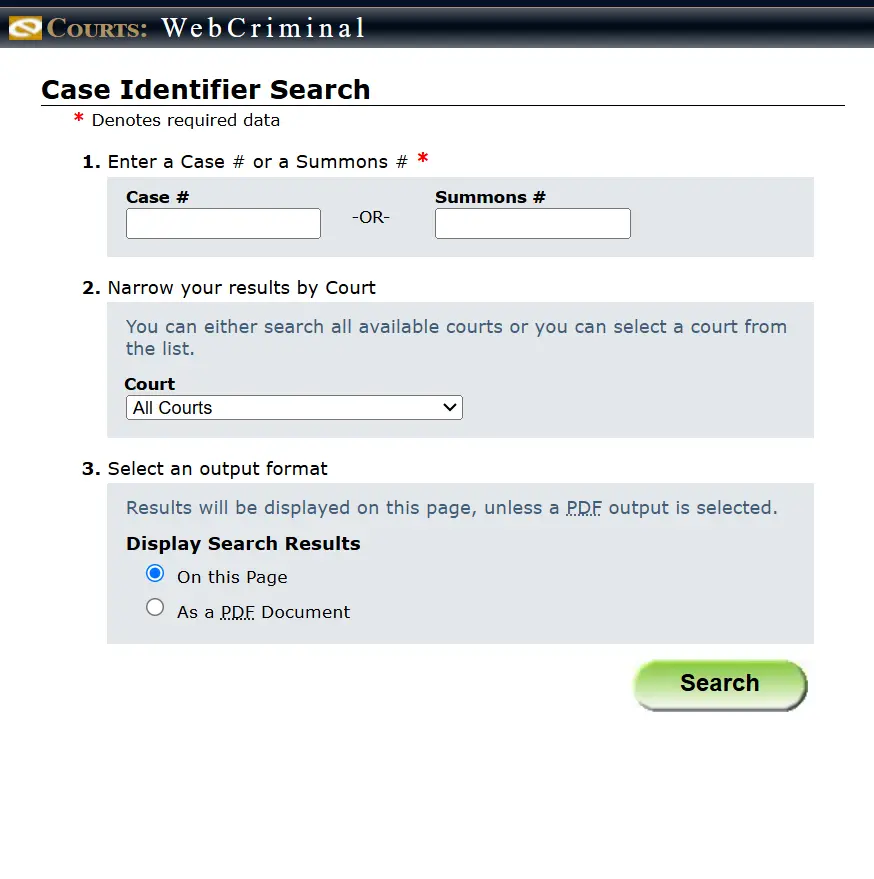
- Step 1 – Open the WebCrims portal: Navigate to the official Case Identifier Search page.
- Step 2 – Enter identifying information:
- Input the exact case number or summons number in the designated field.
- Select the appropriate county from the drop‑down menu, then choose the specific court (e.g., Criminal Court, Supreme Court) that holds the record.
- Step 3 – Execute the query:
- Click the “Search” button to submit your request.
- The results page will list the case type, filing date, current disposition, involved parties, and any upcoming hearing dates. In many instances, a link to a downloadable PDF summary is provided.
After you submit the request, the system generates a PDF file that contains the searchable docket entry and any publicly available filings, which you can save for personal records or further analysis.
Alternative Search Method via Court Clerk Assistance
If the online portal does not return a record—perhaps the case is sealed, still in processing, or the identifier was entered incorrectly—you can contact the clerk of the relevant court. Clerks can perform a manual lookup, verify the identifier, or advise on additional steps required to obtain the complete file.
Counties Included in the WebCrims Database
The search tool covers a broad range of jurisdictions across the state, ensuring that most criminal and civil matters are accessible through a single query.
- New York City: Includes Manhattan, Bronx, Brooklyn, Queens, and Staten Island.
- Nassau County
- Erie County
- Ninth Judicial District Counties:
- Rockland
- Putnam
- Westchester
- Orange
- Du dsch
Information Retrieved from a Case Identifier Lookup
When a query succeeds, the system typically returns the following data elements.
- Case Overview: Includes the official title, filing date, current procedural status (e.g., pending, dismissed, adjudicated), and a roster of attorneys or public defenders representing each side.
- Hearing Schedule: Displays upcoming trial dates, pre‑trial conferences, and any past appearances that have already been entered into the docket.
- Limited Document Access: Depending on the court’s policy, you may view selected motions, judgments, or orders that are not sealed. Full trial transcripts and certain evidentiary filings often remain offline.
Search Filter Options Available on WebCrims
To narrow results and avoid sifting through unrelated cases, the interface offers several filter fields.
- County Filter: Limits output to the jurisdiction where the case was originally filed.
- Court Type Filter: Allows selection of specific courts such as Criminal, Family, or Supreme Court.
- Date Range Filter: Restricts the search to cases filed within a user‑defined time window, which is useful for recent matters or historical research.
By combining these filters with an accurate identifier, users can quickly locate the precise record they need, saving both time and effort.
Benefits of Using the Case Identifier Search
The system delivers several practical advantages for and professionals alike.
- Speed: Immediate retrieval eliminates the need to travel to a clerk’s office or request records by mail.
- Transparency: Public access to docket information fosters confidence in the judicial process and enables community oversight.
- Research Utility: Lawyers, journalists, and academics can gather factual data for case studies, news stories, or policy analysis without extensive field work.
- Self‑Help Support: Parties involved in a proceeding can monitor upcoming deadlines and understand procedural posture without relying on third‑party updates.
Limitations and Potential Drawbacks
its usefulness, the platform has constraints that users should recognize.
- Partial Record Availability: Certain filings remain sealed for privacy, ongoing investigations, or protective orders, meaning the online view may be incomplete.
- Data Currency Issues: Updates may lag behind real‑time filings; users should confirm critical details with the court clerk before relying on the information for legal decisions.
- Technical Interruptions: Server maintenance or high traffic can temporarily disable access, requiring users to retry later.
Practical Tips for Successful Searches
Follow these recommendations to maximize the accuracy and relevance of your results.
- Verify Identifier Details: Double‑check each character of the case or summons number against the source document before entering it.
- Utilize Available Filters: Apply county, court type, and date range filters to eliminate extraneous matches.
- Explore Alternative Queries: If the identifier yields no record, try searching by party name or by the docket’s filing date.
- Seek Clerk Assistance: When online avenues fail, a courteous phone call or email to the appropriate clerk can clarify the status of a sealed or archived case.
Alternative Search Strategies Without an Identifier
When you lack a case number, other methods can still locate the desired record.
- Party Name Search: Input the full name of a plaintiff, defendant, or attorney to retrieve all cases associated with that individual.
- Court Calendar Lookup: Browse scheduled hearings by date to identify cases that are slated for upcoming trial or motion hearings.
both the strengths and the gaps of the Case Identifier Search enables you to choose the most efficient path to the information you need.
FAQs
Below are answers to common questions about locating New York court records using the WebCrims platform.
How do I find my court case in New York?
Begin by visiting the official Case Identifier Search page on the New York Courts website. Enter either the case number or the summons number that appears on any court‑issued document you have received. Choose the correct county and court from the drop‑down menus, then submit the query. The system will display a summary of the case, including filing date, current status, and any upcoming hearing dates. If the online search does not locate your case, contact the clerk of the court where the matter was filed and provide them with any identifying information you possess.
What is the difference between a case number and a summons number?
A case number is assigned once a filing is entered into the court’s docket and remains the permanent reference throughout the life of the proceeding. It typically includes a county code, year, and sequential identifier. , a summons number is attached to the initial summons document that notifies a defendant of charges or claims. This number is used for early‑stage tracking before a formal case number is generated, and it may be replaced by the case number once the docket entry is created.
Can I see all court documents online with the Case Identifier Search?
The searchable database provides public docket information and, when permitted, certain filings such as motions, judgments, and orders. , many documents—especially those containing sensitive personal data, ongoing investigative material, or sealed evidence—are excluded from public view. Users may need to request specific records in person or via a formal FOIL request if the documents are not displayed online.
What if I don’t have my case number or summons number?
When the identifier is unavailable, start by searching using the full names of the parties involved, the attorney of record, or the exact filing date if known. The WebCrims portal includes a party‑name search field that can return all cases where the entered name appears. If those attempts fail, the court clerk can perform a manual lookup using alternative criteria such as the address of the filing party or the nature of the allegation.
Are all New York court cases available online?
The majority of recent civil and criminal matters are digitized and searchable, but older archives—particularly those predating the early 2000s—may not have been uploaded. , cases that are sealed by court order, involve protected juveniles, or contain confidential medical or financial information remain inaccessible through the public portal.
Can I use the Case Identifier Search for cases outside of New York?
No. The WebCrims Case Identifier Search is specific to New York State courts. Each state maintains its own electronic filing system or public access portal, so you will need to consult the appropriate agency for records in another jurisdiction.